
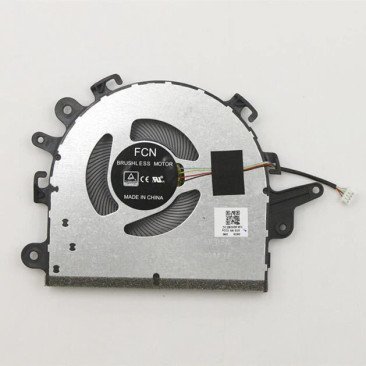
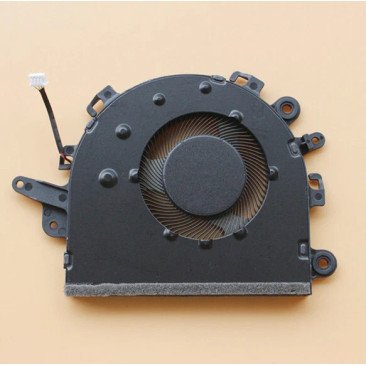


Een defecte laptop koelventilator kan leiden tot luid ventilatorgeluid, oververhitting, slechte prestaties en onverwachte uitschakelingen.
Vervang de defecte ventilator van je laptop door deze. Lenovo IdeaPad 3 15IIL05/15ADA05/15ARE05/15ITL05 Koelventilator ( 5F10S13910 ) en de juiste koeling en stille werking herstellen.
Heeft u hulp nodig bij het vervangen van de ventilator van uw laptop?
Is jouw Lenovo IdeaPad 3 15IIL05/15ADA05/15ARE05/15ITL05 Koelventilator defect, maakt hij te veel lawaai of raakt uw laptop snel oververhit? Dan is het vervangen van de ventilator vaak de beste oplossing. Een goed werkende ventilator zorgt voor stabiele koeling, voorkomt oververhitting en helpt de prestaties van uw laptop te behouden.
Deze laptopventilator is bedoeld als vervanging voor een defecte, versleten of lawaaiige ventilator. Controleer altijd of de ventilator geschikt is voor uw laptopmodel voordat u bestelt. Volledige compatibiliteit en specificaties vindt u verderop op deze pagina.
Weet u niet zeker of dit de juiste ventilator voor uw laptop is? Controleer de compatibele laptopseries en onderdeelnummers op deze pagina of neem contact met ons op voor advies.
Vervangt u de ventilator liever niet zelf? Bekijk dan onze service: Lenovo vervanging van laptopventilator .
Deze laptop ventilator is geschikt voor de onderstaande laptop series. Staat uw model erbij? Controleer dan alsnog de foto, aansluiting, vorm en specificaties voordat u bestelt.
Een defecte laptopventilator zorgt ervoor dat de warmte niet goed wordt afgevoerd. Dit kan leiden tot oververhitting van de processor en schade aan belangrijke onderdelen. Door de ventilator tijdig te vervangen, voorkomt u dure reparaties en verlengt u de levensduur van uw laptop.
Het vervangen van een laptopventilator vereist technische kennis en zorgvuldigheid. In veel gevallen is het beter om dit door een professional te laten doen.
Bij FixHP bieden we een complete oplossing:
Meer informatie: Reparatie van laptopventilatoren
Heeft uw laptop meerdere problemen? Bekijk onze reparatieservice voor laptops .
Controleer altijd zorgvuldig of de ventilator die u wilt vervangen overeenkomt met de originele ventilator. Let op de vorm, de schroefpunten, de connector, het aantal draden, de kabellengte, de positie op de CPU of GPU, de spanning en de stroomsterkte. De foto en specificaties moeten overeenkomen met uw originele onderdeel.
Dit wordt afgeraden. Een defecte ventilator kan oververhitting veroorzaken. Dit kan componenten zoals de processor, grafische chip, moederbord of batterij beschadigen. Vervang de ventilator tijdig.
Het vervangen van een laptopventilator is mogelijk voor gebruikers met ervaring in laptopreparatie. Als u weinig ervaring hebt, werk dan voorzichtig, maak foto's tijdens de demontage en koppel altijd de batterij los voordat u interne onderdelen aanraakt.
Wanneer het koelsysteem geopend is, is het verstandig om de koelpasta te controleren. Oude of uitgedroogde koelpasta kan de koelprestaties verminderen. Het vervangen van de koelpasta zorgt voor een effectievere warmteafvoer.
Ja. Spanning en stroomsterkte zijn belangrijk bij het vervangen van een laptopventilator. Vervang bijvoorbeeld geen 5V-ventilator door een 12V-ventilator of andersom. Een verkeerde ventilator werkt mogelijk niet goed of kan schade veroorzaken.
Meestal niet. Veel laptops met een aparte grafische chip hebben aparte ventilatoren voor de CPU en de GPU. Deze ventilatoren kunnen verschillen in vorm, aansluiting, kabellengte, schroefgaten en luchtstroomrichting. Vergelijk de ventilator altijd met het originele onderdeel.
Wilt u de ventilator liever niet zelf vervangen? Neem dan contact met ons op voor reparatie of vervanging. Laat uw ventilator vervangen

