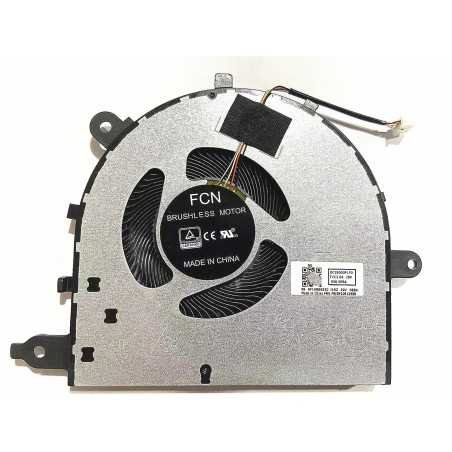


A faulty laptop cooling fan can cause loud fan noise, overheating, poor performance, and unexpected shutdowns.
Replace your faulty laptop fan with this Lenovo Ideapad 5 15IIL05 15ARE05 15ITL05 15ALC05 Cooling Fan 5F10S13906 ( 5F10S13906 ) and restore proper cooling and quiet performance.
Is your Lenovo Ideapad 5 15IIL05 15ARE05 15ITL05 15ALC05 Cooling Fan 5F10S13906 defective, making excessive noise, or causing your laptop to overheat quickly? Replacing the cooling fan is often the best solution. A properly working fan ensures stable cooling, prevents overheating, and helps maintain your laptop performance.
This laptop fan is intended as a replacement part for a defective, worn-out, or noisy fan. Always make sure the fan is suitable for your laptop model before ordering. Full compatibility and specifications can be found below on this page.
Not sure whether this is the correct fan for your laptop? Check the compatible laptop series and part numbers on this page or contact us for advice.
Deze laptop ventilator is geschikt voor de onderstaande laptop series. Staat uw model erbij? Controleer dan alsnog de foto, aansluiting, vorm en specificaties voordat u bestelt.
A defective laptop fan prevents heat from being removed properly. This can cause the processor to overheat and important components to become damaged. Replacing the fan in time helps prevent expensive repairs and extends the life of your laptop.
Replacing a laptop fan requires technical knowledge and care. In many cases, it is better to have this done professionally.
At FixHP, we offer a complete solution:
Always carefully check whether the fan you want to replace matches the original fan. Pay attention to the shape, screw points, connector, number of wires, cable length, CPU or GPU position, voltage, and amperage. The photo and specifications must match your original part.
This is not recommended. A defective fan can cause overheating. This may damage components such as the processor, graphics chip, motherboard, or battery. Replace the fan in time.
Replacing a laptop fan is possible for users with laptop repair experience. If you have little experience, work carefully, take photos during disassembly, and always disconnect the battery before touching internal components.
When the cooling system is opened, it is wise to check the thermal paste. Old or dried-out thermal paste can reduce cooling performance. Replacing thermal paste helps transfer heat more effectively.
Yes. Voltage and amperage are important when replacing a laptop fan. For example, do not replace a 5V fan with a 12V fan or the other way around. An incorrect fan may not work properly or may cause damage.
Usually not. Many laptops with a dedicated graphics chip have different fans for the CPU and GPU. These fans can differ in shape, connector, cable length, screw points, and airflow direction. Always compare the fan with the original part.
Do you prefer not to replace the fan yourself? Contact us for repair or replacement.